
Maximal Square
Maximal Square #1 Most Asked
Medium
Given an m x n binary matrix filled with 0's and 1's, find the largest square containing only 1's and return its area.
Example 1:
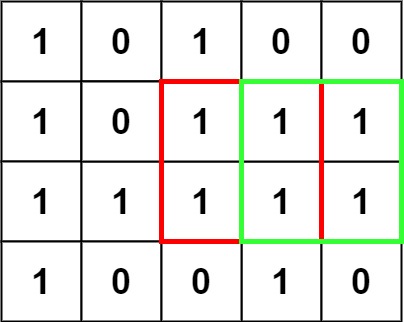
Input: matrix = [["1","0","1","0","0"],["1","0","1","1","1"],["1","1","1","1","1"],["1","0","0","1","0"]]
Output: 4
Example 2:
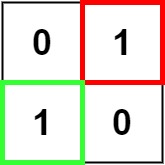
Input: matrix = [["0","1"],["1","0"]]
Output: 1
Example 3:
Input: matrix = [["0"]]
Output: 0
Constraints:
m == matrix.lengthn == matrix[i].length1 <= m, n <= 300matrix[i][j]is'0'or'1'.

Solution
Clarifying Questions
When you get asked this question in a real-life environment, it will often be ambiguous (especially at FAANG). Make sure to ask these questions in that case:
- What should we return if the matrix is empty or null (e.g., of size 0x0)?
- Are the matrix elements strictly characters/integers of '0' and '1', or could they be boolean values?
- If there are multiple squares of the same maximum size, does it matter which one we base our area calculation on?
- Should we modify the input matrix in-place to save memory, or is it expected to remain untouched?
- Can we assume the input matrix is always rectangular (i.e., all rows have the same number of columns)?
Brute Force Solution
Approach
Imagine looking at a grid of zeros and ones and trying to find the biggest possible solid square made entirely of ones. The brute force strategy involves testing every single spot in the grid as a potential top-left corner and checking every possible square size that could grow from it.
Here's how the algorithm would work step-by-step:
- Look at every single cell in the grid one by one, treating each cell as the starting top-left corner of a potential square.
- For a chosen starting cell, first test if it can form a square of size one by simply checking if its own value is a one.
- If it is a one, expand your search by trying to form a square of size two, then size three, and so on, by including the neighboring cells to the right and below.
- As you try to form larger squares, inspect every single cell inside that expanded boundary to make sure every single one of them contains a one.
- If you encounter even a single zero inside the boundary, stop expanding that particular square because it is broken.
- Keep track of the largest successful square size you have managed to build so far as you test different starting spots and sizes.
- After you have exhaustively checked every possible starting spot and every possible square size, report the biggest size you found.
Code Implementation
def maximalSquare(matrix):
    if not matrix or not matrix[0]:
        return 0

    row_count = len(matrix)
    col_count = len(matrix[0])
    max_square_side = 0

    # We test every single cell as a top-left corner to ensure we do not miss any potential square
    for row_index in range(row_count):
        for col_index in range(col_count):
            if matrix[row_index][col_index] == '1':
                current_square_side = 1
                max_square_side = max(max_square_side, current_square_side)

                # We incrementally expand the square boundaries to find the largest valid size from this corner
                while (
                    row_index + current_square_side < row_count and
                    col_index + current_square_side < col_count
                ):
                    is_square_valid = True

                    # We inspect every cell in the new boundary layer to verify no zeros ruin the solid square
                    for check_row in range(row_index, row_index + current_square_side + 1):
                        for check_col in range(col_index, col_index + current_square_side + 1):
                            if matrix[check_row][check_col] == '0':
                                is_square_valid = False
                                break
                        if not is_square_valid:
                            break

                    # We stop expanding if a zero is found because larger sizes from here will also fail
                    if is_square_valid:
                        current_square_side += 1
                        max_square_side = max(max_square_side, current_square_side)
                    else:
                        break

return max_square_side * max_square_sideBig(O) Analysis
Optimal Solution
Approach
Instead of checking every single possible square from scratch, the optimal approach works progressively from top-left to bottom-right, using the results of smaller squares to figure out larger ones. By building up this information step by step, we can instantly determine the biggest possible square ending at any spot.
Here's how the algorithm would work step-by-step:
- Create a blank tracking sheet of the exact same size as the original grid to keep notes on the largest square ending at each specific spot.
- Look at the first row and first column of the original grid. Whenever you see a block that can form a square, mark down a size of one on your tracking sheet; otherwise, mark it down as zero.
- Move through the rest of the grid row by row, from left to right, inspecting each spot.
- Whenever you find a block that is empty, mark your tracking sheet with a zero because no square can end there.
- Whenever you find a block that can be part of a square, look at the three closest neighboring spots you have already processed: the one directly above, the one directly to the left, and the one diagonal up and to the left.
- Find the smallest number among those three neighbors, add one to it, and write that new number onto your tracking sheet for the current spot.
- Keep track of the highest number you write down on your tracking sheet throughout this entire process.
- At the very end, take that highest number and multiply it by itself to find the area of the biggest possible square you discovered.
Code Implementation
def maximalSquare(matrix):
    if not matrix or not matrix[0]:
        return 0

    row_count = len(matrix)
    col_count = len(matrix[0])
    tracking_sheet = [[0] * col_count for _ in range(row_count)]
    max_square_side = 0

    # Initialize the boundary rows and columns to establish our base case for square sizes.
    for row_index in range(row_count):
        for col_index in range(col_count):
            if matrix[row_index][col_index] == '1':
                if row_index == 0 or col_index == 0:
                    tracking_sheet[row_index][col_index] = 1
                else:
                    # A square's size is constrained by the minimum of its top, left, and diagonal neighbors.
                    top_neighbor = tracking_sheet[row_index - 1][col_index]
                    left_neighbor = tracking_sheet[row_index][col_index - 1]
                    diagonal_neighbor = tracking_sheet[row_index - 1][col_index - 1]
                    tracking_sheet[row_index][col_index] = min(top_neighbor, left_neighbor, diagonal_neighbor) + 1

                # Keep track of the largest square edge dimension encountered so far.
                if tracking_sheet[row_index][col_index] > max_square_side:
                    max_square_side = tracking_sheet[row_index][col_index]

    # The area is found by squaring the maximum side length we discovered.
return max_square_side * max_square_sideBig(O) Analysis
Edge Cases
| Case | How to Handle |
|---|---|
| Empty or null matrix input | Return zero immediately since no square can be formed from a non-existent grid. |
| Matrix with dimensions 1x1 containing a single '1' | Dynamic programming state initializes correctly to return an area of 1. |
| Matrix containing all zeros | The algorithm will correctly process the grid and return a maximum area of zero. |
| Matrix containing all ones | The dynamic programming transitions will compound properly across rows and columns to find the full square area. |
| Highly skewed dimensions such as 1x1000 or 1000x1 | Space optimization using a single 1D array or rolling rows prevents excessive memory allocation. |
| Characters represented as strings or non-integer types | Explicit type conversion from character to integer ensures proper arithmetic minimum calculations. |